Your printer stops working right before a client presentation. The office scrambles to find a solution while your team waits. This scenario plays out in Las Vegas businesses every single day. Office printer problems cost companies far more than repair bills.
Most businesses treat printer issues as minor annoyances. However, these problems create serious ripple effects across your entire operation. Employees lose productive hours waiting for fixes. Deadlines get missed. Clients grow frustrated when documents arrive late.
This guide reveals the most common printer problems affecting Las Vegas offices. You’ll discover why these issues happen and what they really cost your business. More importantly, you’ll learn proven prevention strategies that stop problems before they disrupt your workflow. We’ll show you exactly when to fix issues yourself and when to call for professional help.
Three Office Printer Problems You’ll Face This Month
Every Las Vegas business deals with recurring printer troubles. These issues show up repeatedly across all office environments. Understanding what causes them helps you respond faster and prevent future headaches.
Paper Jams and Misfeeds
Paper jams rank as the most frustrating printer issue. Humidity in Las Vegas affects paper quality and causes feeding problems. Worn rollers grab multiple sheets at once. Dust buildup inside the machine creates friction that stops the paper mid-print. Users often load paper incorrectly, which triggers immediate jams.
In short, Environmental factors and improper loading cause most paper jam situations.
Streaks, Fading, and Blurry Output
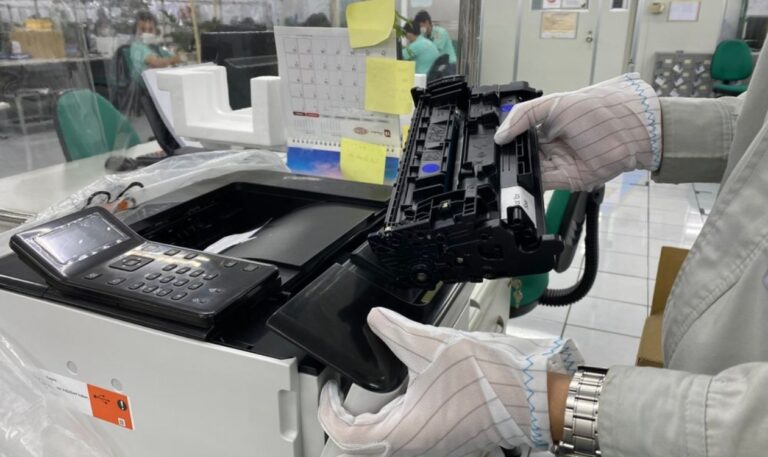
Print quality issues signal deeper problems with your equipment. Low toner creates faded documents that look unprofessional. Dirty printheads leave streaks across every page. Old drums develop defects that show up as repeated marks. These problems worsen gradually until documents become unreadable.
In short, Worn components and depleted supplies produce poor print quality over time.
Connection Failures and Driver Errors
Modern printers rely on stable network connections. WiFi signals drop and prevent printing from mobile devices. Outdated drivers conflict with new operating systems. IP address changes disconnect printers from your network. Software updates sometimes break compatibility without warning.
In short, Network instability and software conflicts stop printers from communicating with computers.
These common office printer problems waste hours of productive work time. Your staff troubleshoots instead of completing actual tasks. Documents pile up while everyone waits for the printer to cooperate. Quick professional service resolves most issues faster than internal troubleshooting attempts.
What Printer Downtime Actually Costs Your Business
Most businesses only calculate the repair bill when printers fail. The real expenses go far beyond service charges. Downtime creates a cascade of hidden costs that affect your entire operation.
Printer failures impact your business through:
- Lost employee productivity as staff wait for repairs or find workarounds
- Missed deadlines that damage client relationships and future opportunities
- Emergency service calls that cost more than scheduled maintenance
- Reduced customer satisfaction when documents arrive late or incomplete
- Workflow bottlenecks that slow down multiple departments simultaneously
- Alternative printing expenses from visiting external print shops
These costs multiply quickly during extended outages. Your team sits idle or travels to other locations to print documents. Projects stall while everyone waits for basic printing capabilities. Office printer problems that seem small initially can halt entire business operations. Regular maintenance programs prevent most downtime situations before they start.
Simple Steps to Stop Printer Issues Before They Start
Prevention saves you more money than emergency repairs. Taking a few proactive measures keeps your equipment running reliably. These strategies reduce breakdowns and extend your printer’s working life.
Keep Equipment Clean Inside and Out
Regular cleaning prevents most mechanical failures.
- Dust accumulation clogs sensors and causes paper jams throughout the machine.
- Cleaning rollers monthly removes debris that affects paper feeding accuracy.
- Wiping down exteriors prevents dirt from entering internal components over time.
In short, Consistent cleaning schedules eliminate the buildup that triggers most equipment failures.
Choose the Right Paper and Toner
Quality supplies prevent common office printer problems from developing.
- Cheap paper sheds fibers that jam mechanisms and damage sensitive parts.
- Off-brand toner clogs printheads and produces inconsistent output quality.
- Proper storage keeps supplies dry and prevents moisture-related feeding issues.
In short: Investing in quality materials protects your equipment and maintains reliable performance.
Teach Staff Correct Operating Procedures
Employee training reduces user-caused problems significantly.
- Proper paper loading techniques prevent jams before they happen.
- Understanding error messages helps staff resolve minor issues quickly without panic.
- Knowing when to call for help stops small problems from becoming expensive repairs.
In short: Well-trained employees handle equipment correctly and catch problems early.
Arrange Regular Professional Checkups
Scheduled maintenance catches problems you cannot see.
- Technicians spot worn parts before they fail during critical work periods.
- Preventive replacements cost less than emergency breakdowns and rushed repairs.
- Professional calibration maintains print quality and extends overall equipment lifespan.
In short, Expert inspections prevent expensive failures through early detection and correction.
Most Las Vegas businesses discover that prevention costs far less than constant repairs. Your equipment runs smoothly without surprise breakdowns. Employees stay productive instead of dealing with frustrating malfunctions. Exploring leasing programs often includes built-in maintenance that handles prevention automatically.
Know When Professional Help Makes Sense
Some printer issues need expert attention immediately. Trying to fix complex problems yourself often makes them worse. Learning the difference between simple fixes and serious issues saves you time and money.
Basic problems like paper jams or empty toner cartridges rarely need professional service. You can clear these issues quickly with simple steps. However, recurring problems signal deeper equipment failures that require technical expertise. Strange noises, burning smells, or error codes you don’t understand all demand immediate professional response.
Professional technicians diagnose problems accurately the first time. They carry the right parts and tools to fix issues on the spot. Quick response prevents small problems from damaging other components. Most experienced providers offer same-day service that gets your office running again fast. Waiting too long for office printer problems turns minor repairs into expensive replacements.
Don’t Let Printer Problems Slow Your Business Down
Office printer problems disrupt your workflow and cost money every time they occur. Prevention through regular maintenance and professional support keeps your equipment reliable. Your team stays productive without constant interruptions from malfunctioning printers.
Sunrise Office Systems provides fast repairs and preventive maintenance for Las Vegas businesses. We respond quickly when problems arise and help you avoid future breakdowns. Our team understands the local environment and how it affects your equipment.
Contact us today to schedule a printer evaluation and learn how preventive service protects your business from costly downtime.